
How AI Automates Blog Scheduling
AI-powered blog scheduling transforms how content teams manage their workflows by automating tasks like keyword research, drafting, SEO optimization, and publishing. This approach drastically reduces the time required to create a post - from 6–8 hours to under 20 minutes. For solo creators and small teams, this means scaling content output without increasing costs or resources.
Key benefits include:
- Increased output: Publish 40–200+ posts monthly compared to 4–8 manually.
- SEO advantages: Build topical authority by publishing entire content clusters, boosting organic traffic by up to 147% in 90 days.
- Cost savings: Replace expensive content agencies with tools like LazySEO ($39/month for 30 articles).
- Time efficiency: Save up to 13 hours per week by automating repetitive tasks.
The process involves:
- Keyword discovery: AI identifies high-impact keywords and content gaps.
- Content creation: Generates SEO-optimized drafts with internal links and images.
- CMS integration: Publishes directly to platforms like WordPress or Shopify.
- Quality control: Teams review and refine content to align with brand voice.
Automation allows businesses to focus on strategy while maintaining a consistent publishing schedule, which is crucial for SEO success. Ready to get started? Tools like LazySEO offer trials to experience the benefits firsthand.
::: @figure 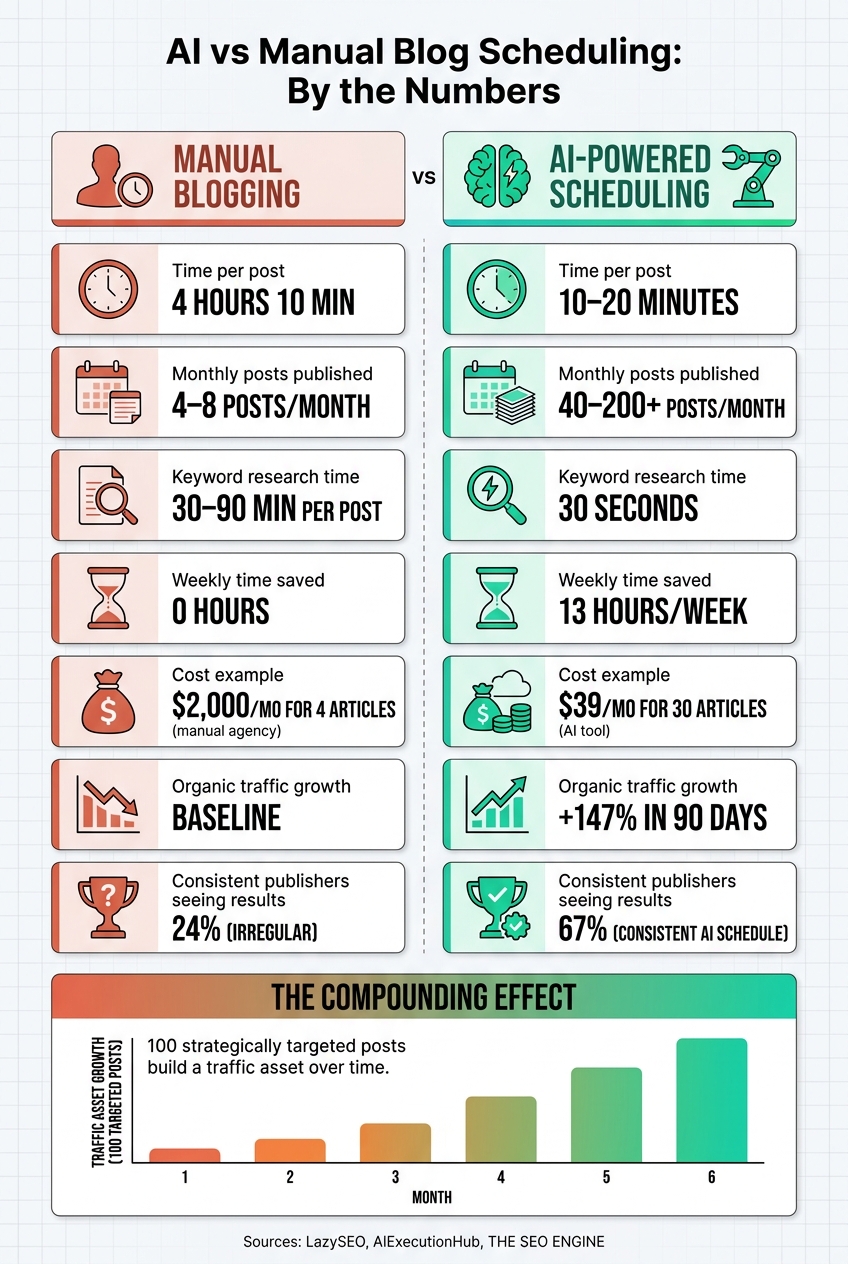 {AI vs Manual Blog Scheduling: Key Stats & Benefits}
:::
{AI vs Manual Blog Scheduling: Key Stats & Benefits}
:::
AI-Driven Blog Scheduling Explained
What Is AI-Driven Blog Scheduling?
AI-driven blog scheduling takes care of the entire content creation process - from finding the right keywords and planning topics to drafting, optimizing for SEO, and publishing directly to your CMS. This eliminates the need for manual tasks like managing spreadsheets or copy-pasting between tools. By comparison, traditional workflows can take 30–90 minutes just for keyword research and often rely on multiple tools for SEO, making AI-powered tools a clear improvement [2][6][7][3]. Now, let’s dive into the features that make this possible.
Key Features of AI Blog Scheduling Tools
The best platforms don’t just schedule your posts - they streamline the entire process from start to finish. Here are some standout features:
- Automated keyword discovery: These tools analyze your site, identify content gaps, and create a list of impactful keywords, which helps you prioritize topics and plan content more efficiently.
- Full article generation: AI transforms keywords into SEO-optimized drafts (up to 2,500 words), complete with relevant images and structured formatting tailored to user intent.
- One-click CMS integration: Finished articles can be published directly to platforms like WordPress, Ghost, Webflow, Shopify, or Framer. No need for plugins or tedious copy-pasting, ensuring a steady publishing schedule with minimal effort.
Take LazySEO, for example. It combines all these capabilities into one seamless workflow. This tool scans your website, identifies rank-worthy keywords, generates SEO-ready articles with internal links, which you can audit using an internal link analyzer, and publishes them on a set schedule - all for $39/month for up to 30 articles. One user shared their experience:
"Replaced my $2k/mo content agency with @lazyseo last quarter. 30 articles for $39 vs 4 articles for $2,000. Quality is genuinely comparable. Internal linking is actually better." - Ryan Tanaka [8]
- Technical SEO automation: Features like automated meta tags, schema markup, and proper heading hierarchies ensure every post is optimized for search engines the moment it’s published.
Why Automating Blog Scheduling Is Worth It
The benefits of AI automation go beyond convenience - they can completely transform your content strategy.
First, automation allows you to scale your output without increasing your team size. While manual teams may produce 4–8 posts per month, AI tools can help you publish anywhere from 40 to over 200 posts monthly, all at a fraction of the cost [3].
The SEO benefits are equally compelling. Publishing entire topic clusters - for instance, 80 interconnected articles instead of just 8 - demonstrates authority to search engines in ways sporadic posting simply can’t. Plus, consistent publishing increases how often search engines crawl your site, meaning new content gets indexed faster [3]. In fact, marketers who stick to a regular publishing schedule report strong results 67% of the time, compared to just 24% for those with irregular posting habits [10].
And let’s not forget the time savings. Automating the entire process from ideation to scheduling saves marketers an average of 13 hours per week [2]. That’s valuable time that can be redirected into higher-level strategy, creative projects, or other business priorities.
How to Prepare Your Blog for AI Automation
Audit Your Blog and Content Strategy
Before diving into automation, take a step back and audit both your blog and overall content strategy. Start by mapping out your workflow - from how you select keywords to the moment you hit publish. Organize your topics into a pillar page strategy, where a central topic is supported by 15–50 related sub-articles. This approach systematically builds topical authority. Also, make sure to document your brand voice in detail. Define your tone, audience, and style guidelines clearly so the AI has a consistent framework to follow. Without this structure, the quality of automated output can decline over time [11][12].
Here’s a handy tip: publish your first 10 automated articles manually. Carefully review each one to ensure it aligns with search intent before you let the system fully automate the process. This step helps establish a quality benchmark and allows you to catch any potential issues early on [3].
Once your strategy is polished, you’re ready to connect your AI tools to your CMS.
Connect AI Tools to Your CMS
Most AI scheduling tools can integrate directly with your CMS through a built-in connection or API. If you’re using WordPress, for instance, you’ll need to generate an Application Password (found under Users → Profile) and provide the AI tool with your site’s endpoint URL (yoursite.com/wp-json/wp/v2/posts). It’s also essential to confirm that your security settings allow these requests.
Platforms like LazySEO simplify this process by offering native support for systems like WordPress, Ghost, Webflow, Shopify, and Framer. This eliminates the need for manual uploads. Once connected, you can map fields - such as the headline and article body - to the appropriate CMS sections. You can also decide whether incoming content should land as a Draft, Pending Review, or go live automatically. Starting with "Draft" mode is a smart move, as it gives you the chance to double-check formatting, image placement, and metadata before anything is published [11].
Another important configuration: ensure the AI tool uploads images directly to your Media Library instead of linking to external URLs. External links can break over time, which could leave your posts looking incomplete.
With your CMS integration set up, the next step is to establish clear publishing rules and SEO guidelines.
Set Publishing Rules and SEO Guidelines
Once your tools are connected, it’s time to define the rules that will keep your automation efforts aligned with your goals. Two key areas to focus on are publishing frequency and keyword targeting.
Your posting cadence should match your domain authority. For instance:
- Sites with a Domain Rating (DR) of 10–20 should aim for 8–12 posts per month.
- Sites with a DR of 41–60 can handle 20–40 posts [10].
Avoid over-publishing on newer sites, as this can overwhelm your crawl budget and send mixed quality signals to search engines.
Another critical rule is to establish an internal linking structure from the start. Every supporting article should link back to its pillar page and connect to one or two related posts. This prevents "content islands", where articles are isolated and difficult for search engines to associate with the rest of your site [10][5]. Additionally, run a keyword cannibalization check to ensure you’re not targeting terms that are already covered by existing content.
By setting these guidelines, you ensure that your automated posts maintain your SEO standards and reflect your brand’s voice, all while keeping your content strategy focused and effective.
"AI reduces the cost of producing words. It increases the cost of producing the wrong words at the wrong time, on the wrong URLs, with the wrong signals." - Matt LaClear, SEO Strategist [13]
Automated SEO Blog Writing With AI (And It Publishes Itself)
::: @iframe https://www.youtube.com/embed/X3x8cEfI0bw :::
Step-by-Step AI Blog Scheduling Workflow
Once your CMS integration and publishing rules are in place, you can follow these steps to streamline your blog scheduling process with AI.
Step 1: Build a Keyword-Driven Content Calendar
AI takes the guesswork out of planning by scanning your site to identify content gaps and high-impact keywords in just 30 seconds [1]. These keywords are grouped into pillar posts and supporting articles, creating a system that builds topical authority over time.
What sets this method apart is how AI prioritizes keywords. It evaluates traffic potential, search volume, difficulty, and revenue opportunities [1][15][16]. Plus, it identifies seasonal trends 3–6 months ahead, so you can schedule content early enough to be indexed before peak traffic hits [14][16]. The result? A rolling content calendar - usually covering 30 articles or a 4- to 6-week schedule - that keeps your posting consistent without the hassle of manual planning.
"An AI content calendar turns a keyword list into a publishing system - with clusters, sequencing, seasonal timing, and a monthly planning cadence you can run in under two hours." - AIExecutionHub [14]
Tools like LazySEO simplify this process by scanning your site and creating a 30-day content plan. For $1, you can try it for 7 days, which includes two AI-generated articles and a detailed keyword analysis [1].
Pro Tip: Publish supporting articles before the pillar post. This way, when the main pillar content goes live, it can immediately link to the supporting pieces, boosting its authority right from the start [14].
After planning, the AI moves on to drafting articles based on these keywords.
Step 2: Auto-Generate SEO-Optimized Article Drafts
With the content calendar ready, the AI shifts focus to drafting. It uses the target keyword, search intent, and competitor SERP data to create a well-structured article. This includes H2/H3 headings, word count recommendations, and internal linking suggestions [14][15][16]. Tools like LazySEO even embed relevant images and videos automatically [1].
The speed here is impressive. AI can process over 10,000 keyword variations in under an hour, and brands using AI for keyword research have seen organic traffic grow by 3.2x compared to manual efforts [16]. On top of that, drafting time is often cut by about 50% [17].
Step 3: Review, Edit, and Approve AI Content
Once the AI generates drafts, it’s time for a quick review to ensure quality and alignment with your brand. Automated drafts often need minor adjustments to refine accuracy and tone.
| Review Category | What to Check |
|---|---|
| Accuracy | Verify statistics, claims, and dates |
| Brand Voice | Ensure tone and vocabulary match your style |
| Originality | Add examples and unique insights |
| SEO Quality | Confirm keyword use, metadata, and links |
| Formatting | Check headings and overall readability |
LazySEO provides an SEO score out of 100 for each draft, helping you focus your edits [1][9]. Once a draft meets your standards, mark it as "Approved" and move it to the next step.
"AI does the volume, humans own the value." - Haseeb Sagheer, AIExecutionHub [5]
Step 4: Schedule and Auto-Publish to Your CMS
With approved drafts ready, the last step is scheduling and publishing. Set your rules once, and tools like LazySEO handle the rest, automatically publishing content to platforms like WordPress, Ghost, Webflow, Shopify, and Framer - no plugins or manual uploads required [1].
This automation can boost organic traffic by 147% within 90 days while cutting down routine publishing tasks by up to 75% [1][18]. It’s a time-saver that allows your team to spend more energy on strategic projects rather than repetitive tasks.
How to Measure the Results of AI Blog Scheduling
Once you've set up an AI-powered publishing workflow, it's crucial to measure how it's impacting your SEO, efficiency, and overall strategy. To do this effectively, focus on three key areas: SEO performance, time saved, and content output efficiency.
Track Key SEO Metrics
During the first 90 days, keep an eye on leading indicators. These include your indexation rate, the number of new keywords ranked (especially those in positions 11–100), and the speed at which new pages are indexed. If your indexation rate drops below 70%, it could point to issues with content quality or crawlability [3].
After six months, shift your focus to lagging indicators. These include organic traffic growth (analyzed by content cluster), improvements in the average ranking positions of your pillar keywords, and lead attribution from organic traffic. For example, a 30-day AI blogging experiment saw indexed pages increase from 137 to 981 - a 616% jump [19].
"Indexation rate... is your early warning system. Below 70% suggests either a quality filter or a technical crawlability issue." - THE SEO ENGINE Editorial Team [3]
These metrics are essential for assessing how well your AI scheduling system is performing.
Calculate Time and Resource Savings
Manually creating blog posts can take 4 hours and 10 minutes per post, meaning 12 posts a month would require about 50 hours of labor [20]. By contrast, setting up AI automation requires an initial investment of 8–15 hours, but it can save 30–40 hours every month moving forward [20]. To calculate your ROI, divide your monthly costs by the number of articles published. For instance, LazySEO charges $39/month for 30 articles, making the time and cost savings clear [9].
"The ROI of blog automation isn't in the writing - it's in the compounding. One post won't move the needle. But 100 strategically targeted posts... build a traffic asset that appreciates while you sleep." - THE SEO ENGINE Editorial Team [20]
Use AI Analytics to Improve Future Content
AI-powered analytics tools can also help refine your content strategy. LazySEO, for instance, provides a dashboard that tracks metrics like clicks, impressions, CTR, and average Google rankings - all in one place, so you don’t have to juggle multiple tabs [9]. It also scans up to 38 competitors in just 30 seconds to identify content gaps you might have missed [9].
It's also important to monitor content decay - when older pages that once ranked well start losing traffic. For data-heavy posts like pricing pages or statistics roundups, refreshing the content monthly can help maintain visibility. This is especially relevant as AI search tools like Perplexity increasingly favor content less than three months old, which accounts for 54% of citations on Perplexity AI [21]. Use your analytics dashboard as a continuous feedback loop to keep your content strategy sharp.
How to Keep Quality and Control in AI Blog Scheduling
Once you've set up an AI scheduling workflow, the next step is ensuring consistent quality and maintaining control over the content it produces. Automation can simplify processes, but without proper oversight, it can also magnify mistakes. Here’s how to keep things on track.
Set Editorial and Legal Guardrails
Start by creating a quality rubric - a clear scoring system to evaluate each draft for accuracy, intent alignment, and originality. This helps prevent subpar or off-brand content from slipping through unnoticed [13][22].
Define your brand voice with 5–7 specific descriptors like "data-driven", "straightforward", or "minimal jargon." Avoid vague instructions like "be professional." To make it easier for AI to follow, provide 2–3 example passages that illustrate your tone. Concrete examples are far more effective than abstract style guides [22]. Additionally, maintain a banned phrase list for overused or generic AI-generated phrases, such as "In today's digital landscape", and flag them during editing.
An often overlooked but critical safeguard is an emergency pause mechanism. Set clear triggers - such as a sudden spike in indexation without corresponding impressions or flagged inaccuracies - that halt automated publishing and shift the process into manual review mode [13].
"AI reduces the cost of producing words. It increases the cost of producing the wrong words at the wrong time, on the wrong URLs, with the wrong signals. A system is what keeps your campaign from scaling its own mistakes." - Matt LaClear [13]
For industries like legal, medical, or financial, involve a subject matter expert (SME) to review and approve posts before they go live. Automated checks alone won't cut it when high-stakes claims are involved [13][23].
Once these guardrails are in place, regularly updating your AI parameters ensures your content adapts to changing trends and standards.
Update AI Settings Regularly
AI scheduling isn’t a "set it and forget it" operation. As keyword priorities shift and content clusters evolve, your setup must adapt. Maintain a changelog for your editorial standard operating procedures (SOPs) so everyone knows which rules apply to each post [13].
A good rule of thumb: Review keyword priorities and publishing guidelines monthly. For internal linking, update configurations whenever you publish a new content cluster. If tools like LazySEO reveal new keyword opportunities or competitor shifts, adjust your content calendar accordingly.
Audit Published Content on a Schedule
Regular audits are essential to ensure older content stays relevant and meets your quality standards. Review high-priority posts every 60–120 days using Search Console data to identify those with declining click-through rates due to query drift [5]. Posts ranking between positions 5–20 with falling clicks are prime candidates for updates.
Focus on the bottom 20% of posts by traffic during audits. These underperforming pieces might need to be consolidated, rewritten, or even removed - especially if they overlap with stronger content on similar topics [24]. Letting weak or redundant content pile up can harm your site. For example, Google’s March 2024 Core Update specifically targeted sites where AI-generated content made up 90–100% of the output [24].
"The workflow is the product." - Daniel Agrici, Co-Founder, Rankenstein [22]
Auditing isn’t just about fixing low performers. It also creates a feedback loop to refine your AI settings, ensuring that future content starts from a better baseline.
Conclusion: What AI Blog Scheduling Does for Your Business
Did you know that creating a blog post manually takes about 4 hours and 10 minutes on average? With AI-driven workflows, that time shrinks dramatically to just 10–20 minutes per post[4][20]. Now, consider this: companies that publish 16+ articles per month see 3.5 times more traffic compared to those posting four or fewer[20]. The connection is clear - AI scheduling can transform how your business approaches content creation.
Consistency isn’t just about saving time; it’s about building authority. Publishing regularly, say 4–7 articles per week, tells search engines your site is active and credible. But maintaining that rhythm manually? It’s no small feat. That’s where platforms like LazySEO shine. From keyword research to auto-publishing, everything runs on autopilot. Users have even reported an average organic traffic boost of 147% within just 90 days[1].
"The ROI of blog automation isn't in the writing - it's in the compounding. One post won't move the needle. But 100 strategically targeted posts... build a traffic asset that appreciates while you sleep." - The SEO Engine Editorial Team[20]
By automating the repetitive tasks - drafting, formatting, and scheduling - you can free up your team to focus on strategy and quality control. A 70/30 split works well: let AI handle the heavy lifting while your team sharpens the content’s accuracy and strategic direction. This balance is what separates thriving content operations from those constantly playing catch-up.
Ready to see the benefits for yourself? Try LazySEO’s 7-day trial and experience the ease of automated blog scheduling firsthand[1].
FAQs
::: faq
How do I keep AI-written posts accurate and on-brand?
Maintaining accuracy and staying true to your brand's voice is essential for creating impactful content. One effective approach is incorporating a human-in-the-loop review process. This method blends automation with human oversight for the best results.
For example, tools like LazySEO can analyze your website to align with your brand's tone, vocabulary, and style. These tools streamline the process by ensuring your content reflects your established brand identity.
To make the process even smoother, use structured prompts to clearly define your audience and content goals. This step helps ensure your content is targeted and relevant.
Finally, dedicate 10–15 minutes per post for a human editor to step in. During this review, they can check for factual accuracy, ensure the tone matches your brand, and confirm proper formatting. This extra layer of attention can make all the difference before hitting "publish." :::
::: faq
What should I automate first in my blog scheduling workflow?
To streamline your efforts, begin by reviewing your workflow to pinpoint tasks that are repetitive or follow strict rules, as opposed to those requiring creativity. Start by establishing a solid keyword strategy. Create a topic cluster map that outlines core pages, pillar topics, and related supporting keywords. With this foundation set, you can then automate repetitive tasks such as topic research, scheduling, and CMS publishing. This approach not only saves time but also boosts overall efficiency. :::
::: faq
How can I tell if AI scheduling is improving my SEO?
Use Google Search Console and your analytics tools to track essential data points like crawl stats, organic impressions, and keyword rankings. Pay attention to the ratio of published content versus indexed pages - this can reveal potential crawl budget problems.
To make things easier, tools like LazySEO provide real-time dashboards that visualize metrics such as clicks, impressions, and SEO scores. These insights can help you pinpoint areas for improvement and monitor traffic growth effectively. :::